Newbie Guide (Part 1)
Table of Contents
- Introduction
- Getting Started
- Step 1: Tutorial and Navigation
- Step 2: Tax Management
- Step 3: Community Interaction
- Step 4: Storage Management
- Step 5: Resource Management
- Step 6: Food System
- Step 7: Protection and Security
- Step 8: Alliances
- Step 9: Week 1 Goals
- Step 10: Additional Tips
Introduction
This is Illyriad, Welcome!
Illyriad is a unique and deep game that offers a different experience from many other games. Here's what makes it special:
- Perpetual Game: The server never ends or restarts - there is no winner or end-game
- Sandbox Style: Play how you want to play
- Dynamic World: Constant state of flux with occasional conflicts, tournaments, and new content
- Community Driven: Active player base that shapes the game world
This guide will help you through your first week of gameplay, setting you up for success in the world of Illyriad.
Getting Started
Step 1: Tutorial and Navigation
- Complete the Tutorial
- Finish King Sigurd's tutorial
- Receive your gift package
-
Learn basic game mechanics
-
Learn the Interface
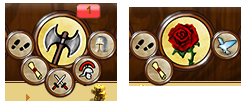
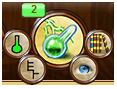
- Locate the Seals at the top of the window
-
Each Seal has various Satellites (hover over a Seal to reveal them)

-
Master the World Map
- Click the World Map Seal to view the map
- Learn to use:
- View slider (zoom control)
- Compass (map movement)
- "View Strategic Map" link

Pro Tip: Click the tower in the middle to re-center the map on your town
- Use In-Game Help
- Look for tutorial icons around the game
- Click these for quick reminders about game mechanics
Step 2: Tax Management
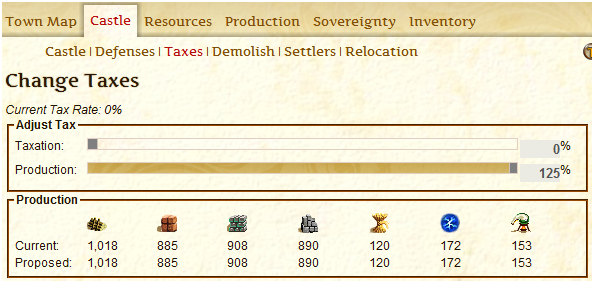
- Access Tax Settings
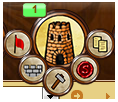
- Click on your castle
-
Navigate to the taxes tab
-
Optimize Your Taxes
- Set taxes to 0% (increases resource production to 125%)
- Note: Can only change taxes once every 24 hours
- Default is 25%, but early game focus should be on resources, not gold
Step 3: Community Interaction
- Join Global Chat
- Locate and introduce yourself in Global Chat
-
Use the window icon to resize chat window

-
Check Incoming Trades
- Look for blue box with number (indicates incoming trades)

- Use Movements Satellite (footprints) to track incoming goods
- Thank gift-givers in Global Chat
Important: Keep chat PG-rated. The game has an auto-ban system for inappropriate language.
Step 4: Storage Management
- Check Storage Capacity
- Click Inventory Satellite (2 papers)
-
View Fill Levels
-
Upgrade Storehouse
- Build Storehouse to level 3 (minimum)
- Advanced Tip: Don't level Storehouse past 15
- Level 15 unlocks Warehouse research
- Limited build plots make higher levels inefficient
Step 5: Resource Management
- Build Resource Plots
- Level up to 7: Lumberyard, Clay Pit, Quarry, and Iron Mine
-
Keep production levels balanced across all resources

-
Resource Strategy
- Focus on one of each type at a time
- Example progression: Level 1 of each → Level 2 of each → etc.
- Monitor top number (storage) and bottom number (production per hour)
Step 6: Food System
- Understanding Food
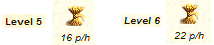
- Food provides population (not used for armies)
-
Buildings have food upkeep that increases with level
-
Food Management
- Maintain food production between 0 and 20
- Never let food production go negative
- Build Farmyard immediately if food production becomes negative
Step 7: Protection and Security
- Newbie Protection
- Lasts 7 days from start
-
Indicated by rainbow above town

-
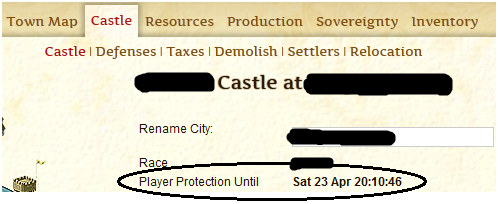
Protection Expiration
- Check expiration time in castle view
- Don't build army during protection
- If attacked, seek help in Global Chat
Step 8: Alliances
- Alliance Options
- Joining an alliance is optional
-
Access via Alliance List Satellite (star)

-
Finding an Alliance
- Research in Global Chat
- Check Alliance List
- Visit Alliance Recruitment Forum
- Click player names to view alliance information
Step 9: Week 1 Goals
Building Goals
- Storehouse: Level 10
- Resource Plots (3 each): Level 7
- Lumberjack
- Clay Pit
- Quarry
-
Iron Mine
-
Library: Level 10
- Architect's Office: Level 10
- Marketplace: Level 5
- Mage Tower: Level 3
Research Goals
- City Research
- Timekeeping
- Craftsmanship
- Agriculture
- Bureaucracy
- Architecture
- Pioneering
- Bookbinding
- Safeguard
-
Milling
-
Diplomacy Research
-
Negotiation
-
Quest Research
- Brewing
-
Bartending
-
Magic Research
- Arcana
- Runes
- Mark of Seeking
-
Mark of Slaying
-
Military Research
-
Militia
-
Trade Research
- Haggling
- Bartering
- Improved Loading
- Chain Gang
- Cotters
- Foraging
- Grape Picking
Step 10: Additional Tips
- Daily Rewards
- Claim Daily Log-In Bonus
-
Access via Herald Satellite (H)

-
Queue Management
- Keep building queue full
- Focus on resource plots
-
Keep research queue full
-
World Map Features
- Watch for NPC armies

- Don't move town early (wait until second town)
Conclusion
Congratulations on completing your first week in Illyriad! You're now a fully-fledged newbie. Remember:
- Everyone starts here
- Questions are normal and welcome
- The community is here to help
Ready for more advanced topics? Continue to Newbie Guide - 2 for deeper gameplay mechanics and strategies.